Author: Sienna Lowery

I believe that adulthood doesn't have to feel like a constant state of emergency if you have the right systems in place. My goal is to strip away the gatekeeping and give you the actual, unpolished steps to making your life run smoother.

Learn how to write a professional email.

Master the Art of Writing Emails That Get Responses

Ever spent twenty minutes staring at a blinking cursor, rewriting the same three sentences because you’re terrified of sounding “unprofessional”? We’ve been sold this lie that how to write a professional email requires a PhD in etiquette and a vocabulary full of archaic, stuffy words like per my last email or please be advised. Honestly, it’s exhausting. I spent my early days in the freelance world thinking I had to mask my personality behind a wall of corporate jargon just to be taken seriously, but all that did was make my inbox a source of constant micro-anxiety.

I’m over the gatekeeping and the performative formality that serves no actual purpose. In this guide, I’m stripping everything back to the basics so you can stop overthinking and start hitting send. I’m going to show you my personal, repeatable systems for crafting clear, effective messages that get results without making you feel like a robot. This isn’t about following outdated rules; it’s about minimizing the friction of digital communication so you can get back to your actual life.

Table of Contents

Understanding How to Write a Professional Email

Understanding How to Write a Professional Email.

Before you start typing, you need to realize that an email isn’t a text message to your best friend, but it also shouldn’t feel like you’re writing a legal brief. The goal is to find that sweet spot of business communication etiquette where you sound competent without sounding like a robot. I used to spend twenty minutes agonizing over every syllable, thinking that “professional” meant “stiff,” but I was wrong. It actually just means being intentional with your words so you don’t waste anyone’s time.

The foundation of a good interaction starts before they even open the message. If your subject line is vague or just says “Hey,” you’re already losing them. You want to master professional email subject lines that act as a mini-summary; think of it as a way to help the recipient prioritize their day. Once they click, your goal is to maintain email tone and clarity throughout the body. You want to be direct about what you need or what you’re providing, keeping the fluff to an absolute minimum so your actual point doesn’t get lost in a wall of text.

Key Things to Know

Key Things to Know: professional email subject lines.

Before you even start typing your first sentence, you need to get the “skeleton” of the message right. I used to spend way too long staring at a blank screen, but I’ve realized that most of the stress comes from missing the basics. First up, your professional email subject lines are your first impression; if they’re vague or look like spam, nobody is opening them. Keep them short and descriptive so the recipient knows exactly why you’re landing in their inbox.

Once they actually click, you have to nail the vibe. This is where business communication etiquette really matters. You don’t need to sound like a 19th-century lawyer, but you also shouldn’t text your boss like you’re talking to a group chat. Aim for a balance of email tone and clarity—be polite, be direct, and for the love of everything, get to the point. People are busy, and they will appreciate you more if they don’t have to hunt through three paragraphs of fluff to find your actual question.

Practical Tips and Steps

Practical Tips and Steps for emails.

Instead of staring at a blank screen for twenty minutes, I’ve learned to rely on a few repeatable systems. First, let’s talk about the entry point: your subject line. You want to avoid being vague, but you also don’t need to write a novel. Think of professional email subject lines as a tiny headline that tells the recipient exactly why they should care. If you’re asking for a meeting, put “Meeting Request: [Project Name]” rather than just “Hi.” It saves everyone time and keeps your inbox from becoming a black hole of “unread” notifications.

Once you’re in the body of the message, focus on email tone and clarity. I used to think being professional meant using big, fancy words to sound smart, but that actually just creates friction. Real business communication etiquette is about being concise. State your purpose early, use bullet points if you have more than two questions, and read it back to yourself once to make sure you don’t sound accidentally passive-aggressive. If it’s too long, you’re probably overthinking it—just cut the fluff and hit send.

Common Mistakes to Avoid

The biggest mistake I see people make is treating an email like a text message to a friend. We’ve all been there—typing out a quick, lowercase “hey, can you send that file?”—but when you’re in a work setting, that lack of structure can make you look disorganized or, worse, disrespectful. One of the fastest ways to lose credibility is by ignoring basic business communication etiquette, like skipping a proper greeting or failing to proofread for typos. If your message looks rushed, people will assume your work is rushed, too.

Another huge pitfall is the “wall of text.” If you send a massive, unformatted paragraph, your recipient is almost certainly going to skim it and miss your actual request. You have to prioritize email tone and clarity by keeping things concise. Also, don’t forget that your subject line is your first impression; if it’s vague or empty, your email is going straight to the digital abyss. Avoid being overly casual, but don’t get so stiff that you sound like a robot. Just aim for clear, intentional, and respectful every single time.

Final Thoughts

At the end of the day, don’t let the fear of sounding “unprofessional” paralyze you. Most people are just as busy as you are, and they actually appreciate it when you get straight to the point. Mastering business communication etiquette isn’t about using big, fancy words to sound important; it’s about respecting the other person’s time by being clear and concise. Once you have these basic systems down, sending an email becomes a mindless task rather than a source of anxiety.

If you find yourself stuck, just lean on the templates and structures we talked about. Whether you’re obsessing over your professional email subject lines or trying to nail the perfect sign-off, remember that consistency beats perfection every single time. My goal isn’t for you to become a corporate robot, but to help you build a workflow where you can hit send and actually move on with your day. Stop overthinking the nuances and just start implementing these small shifts. You’ve got this.

My Cheat Sheet for Not Sounding Like a Robot (or a Mess)

  • Use a clear, “no-fluff” subject line. If I’m scanning my inbox, I don’t want to guess what an email is about; tell them exactly what’s inside, like “Question regarding Tuesday’s meeting” instead of just “Hey.”
  • Stick to one main point per email. I’ve learned the hard way that if you bury three different requests in one giant paragraph, people will only answer the easiest one and ignore the rest. Keep it focused so they can actually help you.
  • Read it out loud before you hit send. This is my go-to trick for catching weird phrasing or accidentally aggressive tones. If it sounds awkward when you say it, it’s going to look awkward on their screen.
  • Stop apologizing for existing. Phrases like “Sorry to bother you” or “I just wanted to check in” actually weaken your position. Just state your purpose—it’s more efficient and shows you respect your own time as much as theirs.
  • The “Action Item” rule. Always end your email by clearly stating what you need the other person to do. Don’t leave them guessing; tell them if you need a signature, a date, or just a simple “yes” or “no.”

The TL;DR on Inbox Sanity

Keep it brief; if you can say it in three sentences instead of three paragraphs, do it. Respect people’s time, and they’ll respect yours.

Use a clear, “no-fluff” subject line so the recipient actually knows why they’re opening the email before they even click.

Always double-check your tone. Since you can’t hear a person’s voice through text, a quick read-through ensures you don’t accidentally sound passive-aggressive or totally unprofessional.

Wrapping It All Up

At the end of the day, mastering the professional email isn’t about sounding like a corporate robot or using words you’d never say in real life. It’s really just about clarity and respect—respect for the other person’s time and clarity in your own intentions. We’ve covered the essentials: keeping your subject lines punchy, ditching the fluff, and using a structure that actually makes sense. If you can nail a simple greeting, get straight to the point, and end with a clear call to action, you’re already ahead of most people in my inbox. Remember, the goal is to minimize the back-and-forth so you can stop staring at your screen and get back to your actual life.

I know that hitting “send” on an important message can still feel a little nerve-wracking, especially when you’re trying to find that perfect balance between friendly and formal. But please don’t let the fear of a typo or a slightly awkward phrasing keep you stuck in draft mode. Adulthood is mostly just us all figuring it out as we go, and most people are much more forgiving than your inner critic wants you to believe. Build your templates, trust your systems, and just start sending. You’ve got this.

Frequently Asked Questions

How do I know when it's okay to be casual versus when I need to be strictly professional?

It really comes down to reading the room—or the thread. My rule of thumb? Mirror the energy you’re receiving. If they’re sending “Hey!” and using emojis, you can breathe a little. But if they’re formal and structured, stay in that lane. When in doubt, always lean toward professional. It’s much easier to dial it back later than it is to recover from looking like you don’t take the job seriously.

Is it weird to use emojis in a work email, or is that becoming more acceptable?

Honestly, it depends on your office culture, but the short answer is: read the room. If your boss uses them, you’re probably safe to drop a single smile or a thumbs-up to soften a request. But if you’re emailing a new client or a high-level exec for the first time, keep it strictly text. I use them sparingly to add a bit of warmth, but I never let them replace actual clarity.

What should I do if I realize I sent an email with a major typo or forgot an attachment?

First, take a breath. We’ve all been there, and no, it’s not the end of your career. If it’s a small typo, just let it go—fixing it often draws more attention to the mistake. But if you forgot an attachment or messed up a crucial detail, send a quick, breezy follow-up immediately. “So sorry, forgot the attachment!” is perfectly fine. Don’t over-apologize; just fix the error and move on.

Family-friendly healthy dinner ideas for everyone.

Family-friendly Healthy Dinners Everyone Will Love

We’ve all been there: it’s 6:30 PM, you’re staring blankly into a fridge that contains half an onion and some questionable yogurt, and the sudden urge to just order takeout is overwhelming. The problem isn’t that you don’t care about your nutrition; it’s that the mental load of deciding what to cook after a long day of work feels like a second job. Most of the healthy dinner ideas you see on social media involve thirty ingredients and two hours of active prep time, which is just not realistic for anyone trying to maintain a semblance of a life.

I’m over the gatekeeping and the aesthetic, overly complicated recipes that end up gathering dust in a cookbook. Instead, I want to give you the actual, low-friction systems I use to keep myself fed without losing my mind. In this post, I’m breaking down five of my go-to, minimalist dinner setups that prioritize efficiency and flavor. You’re going to learn how to build meals that are genuinely nourishing but require almost zero decision fatigue, so you can actually spend your evening relaxing instead of hovering over a stove.

Table of Contents

The Sheet Pan Strategy

Easy cooking with The Sheet Pan Strategy.

If you’re like me, the last thing you want to do after a long day of staring at a screen is scrub five different pots and pans. This is where the sheet pan method becomes your absolute best friend. You basically just toss a protein—think salmon fillets or chicken thighs—onto a tray with whatever veggies are looking sad in your crisper drawer, drizzle some olive oil and salt, and let the oven do the heavy lifting. It’s the ultimate low-effort, high-reward system for when your brain is fried.

The "Grain Bowl" Assembly Line

The "Grain Bowl" Assembly Line meal prep.

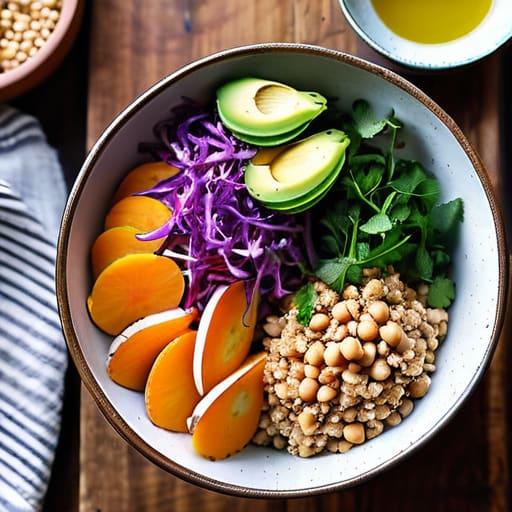
I used to think meal prepping meant spending my entire Sunday Tupperwaring identical portions of broccoli and chicken, but that honestly felt so clinical and boring. Instead, I’ve switched to a modular assembly line. I prep a big batch of a base—like quinoa, farro, or even just brown rice—and then keep a variety of shelf-stable toppings ready to go. It’s less about a strict recipe and more about building a system that adapts to whatever you have on hand.

One-Pot Pantry Pasta

Nutritious One-Pot Pantry Pasta with beans.

We all have those nights where the fridge looks completely empty, and the thought of a grocery run feels impossible. This is when I lean hard into my pantry staples. A box of whole grain pasta, a jar of marinara, and a tin of chickpeas or white beans can turn into a legitimate, nutrient-dense dinner in under fifteen minutes. It’s not gourmet, but it’s reliable and filling, which is exactly what you need when you’re running on empty.

Breakfast for Dinner (The Realistic Version)

Let’s be real: sometimes the most “efficient” dinner is just the meal you already know how to make perfectly. I’m a huge advocate for the “breakfast for dinner” pivot. Scrambling some eggs with a side of sautéed greens or making a quick veggie omelet takes about six minutes and requires almost zero mental bandwidth. It’s a sanity-saving hack for those nights when your decision fatigue is at an all-time high.

The "Big Batch" Soup Hack

There is a specific kind of peace that comes from having a massive pot of soup sitting in the fridge. I started making “dump soups” whenever I had an extra twenty minutes. You basically take whatever broth you have, throw in some lentils, canned tomatoes, and hearty veggies, and let it simmer. It’s the most cost-effective way to meal prep because you can use up all those random bits of produce that are about to go bad.

The Bottom Line

Stop aiming for Pinterest-perfect meals; focus on building a rotation of “emergency” dinners that require zero brainpower and minimal cleanup.

Systems beat willpower every single time—invest in a few reliable tools and pre-prepped staples so you aren’t negotiating with your hunger at 7 PM.

Nutrition doesn’t have to be complicated to be effective; if it’s simple, sustainable, and keeps you from ordering takeout, it’s a win.

The End of the Dinner Panic

At the end of the day, getting healthy food on your plate isn’t about following a rigid, Pinterest-perfect meal plan that leaves you feeling defeated by Tuesday. It’s about building a toolkit of low-effort wins—whether that’s mastering a single sheet-pan recipe, leaning on frozen veggies, or having a reliable “emergency” pantry staple ready to go. The goal isn’t perfection; it’s about creating a system that works for your actual life, even when you’re tired, busy, or just completely over it. When you stop trying to cook like a chef and start cooking like a person with a job and a life, everything gets a lot easier.

Please, stop treating every single meal like a high-stakes performance review. If you end up eating a bowl of cereal or a piece of toast because you simply don’t have the bandwidth for a full recipe, that is okay. Adulthood is a marathon, not a sprint, and your nutrition should serve you, not the other way around. Focus on these small, repeatable systems, and you’ll find that the 6 PM panic starts to fade away. You’ve got this, and more importantly, you’ve got a plan.

Frequently Asked Questions

How do I keep these meals from feeling like the same repetitive cycle every single week?

Honestly, the “same old thing” fatigue is real. The trick isn’t buying more ingredients; it’s about swapping your flavor profiles. I use a “base + sauce” system. One week, my roasted veggies and protein are Mediterranean with lemon and feta; the next, I hit them with soy sauce and ginger for an Asian-inspired vibe. Same prep, totally different meal. It breaks the monotony without adding any extra dishes to my sink.

What’s the best way to prep these without spending my entire Sunday afternoon stuck in the kitchen?

The secret is component prepping, not full meal prepping. Don’t spend four hours making individual Tupperware containers of specific meals; that’s how you end up bored by Tuesday. Instead, spend 45 minutes roasting a big tray of veggies, boiling a pot of grains, and prepping one protein. That’s it. Now you have building blocks. You can throw them together in five minutes during the week without feeling like you’re eating the same sad leftovers.

Can I actually make this work on a tight budget, or is "healthy eating" just code for expensive grocery hauls?

Honestly? It’s a total myth that you need a $200 weekly grocery haul to eat well. Most “wellness influencers” are selling a lifestyle that’s actually just a high budget. I’ve learned that the real hack is focusing on staples—think lentils, frozen veggies, and eggs—rather than expensive superfoods. If you shop the perimeter and buy generic, you can eat incredibly well without draining your savings. It’s about the system, not the price tag.

Page 19 of 19

Powered by WordPress & Theme by Anders Norén