
I used to think that being “organized” meant having a color-coded planner and a subscription to every productivity suite on the market, but honestly? That was just a recipe for burnout and a drained bank account. I spent way too much time feeling like I was drowning in digital clutter before I realized that the best free apps aren’t the ones with the flashiest interfaces, but the ones that actually work when your brain is fried. We live in a world that tries to gatekeep efficiency behind monthly fees, but you shouldn’t have to pay a premium just to keep your head above water.
In this post, I’m stripping away the fluff and sharing the five specific tools I rely on to keep my freelance life from turning into a total disaster. These aren’t just random suggestions from an app store algorithm; these are the actual, unpolished tools that have helped me build systems that stick. By the end of this, you’ll have a streamlined digital toolkit that helps you reclaim your time without spending a single cent.
Table of Contents
Notion for the mental clutter
I used to have a million sticky notes scattered across my desk, and honestly, it just felt like I was managing chaos rather than actually working. Notion became my digital brain where I dump everything from my freelance project timelines to my grocery lists. It’s not just a note-taking app; it’s a space where I can build a system that actually makes sense to me, rather than trying to force my brain into a rigid, pre-made template.
Google Calendar for time blocking
If it isn’t on my calendar, it basically doesn’t exist. I’ve learned the hard way that “I’ll do it later” is just a lie I tell myself to avoid stress. Now, I use Google Calendar to time block my entire day, including dedicated slots for things like meal prepping or even just sitting down to answer emails. It keeps me from overcommitting and helps me see exactly how much actual breathing room I have between tasks.
Trello for visual task management
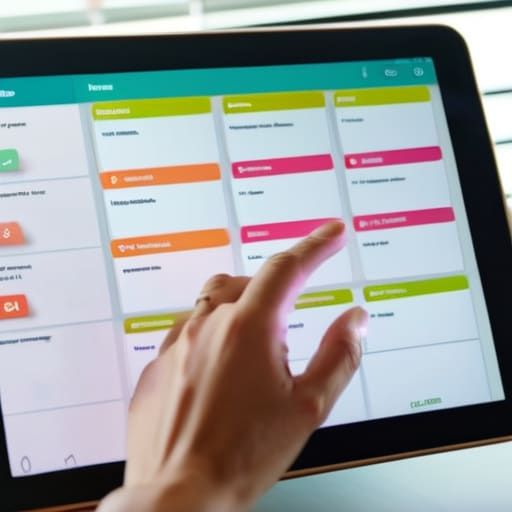
Some of us just aren’t wired for long, intimidating lists of text. When my freelance workload starts feeling heavy, I move my tasks over to Trello because the visual board layout makes everything feel much more manageable. There is something weirdly satisfying about physically dragging a card from “Doing” to “Done”—it’s a tiny hit of dopamine that actually keeps me motivated to keep going.
Forest to stay off my phone
Let’s be real: my phone is my biggest productivity killer. I’ll sit down to work and suddenly find myself forty minutes deep into a TikTok scroll. I started using Forest to gamify my focus, and it’s been a total game-changer for my attention span. You basically plant a digital tree, and if you leave the app to check social media, your tree dies. It sounds silly, but the guilt of killing a tiny digital plant is surprisingly effective.
Splitwise to end the money awkwardness
Living a somewhat independent life means dealing with shared expenses, whether it’s splitting a utility bill with a roommate or settling up after a group dinner. I used to dread that awkward moment of “who owes what,” but Splitwise has completely removed the friction from my social finances. It keeps a running tally of everything so there’s no more mental math or weirdly timed Venmo requests.
The bottom line
You don’t need a massive budget or a complicated setup to get organized; you just need a few reliable, free tools that actually work for your specific workflow.
The best app in the world is useless if you don’t actually use it, so pick one or two that feel intuitive and stick with them until they become a habit.
Stop chasing “productivity porn” and perfect aesthetic setups—the goal is to reduce friction in your day, not to spend three hours customizing a digital planner.
The Bottom Line
At the end of the day, these apps aren’t about becoming some hyper-productive robot; they’re just about reclaiming your headspace. Whether you’re using a simple task manager to stop the mental loop of “did I forget something?” or a note-taking tool to dump your random 3 a.m. ideas, the goal is the same: reducing friction. You don’t need a complex, ten-step digital ecosystem to be functional. You just need a few reliable, zero-cost tools that actually work with your brain instead of fighting against it. Pick one or two from this list that feel intuitive, set them up once, and let them do the heavy lifting so you don’t have to.
I know that starting a new system can feel like just another chore on an already overflowing to-do list, but I promise it’s worth the initial five minutes of setup. Adulthood is messy, and your digital tools shouldn’t make it feel more complicated than it already is. Don’t get caught in the trap of “productivity porn” where you spend more time organizing your life than actually living it. Just grab these tools, build your systems, and get back to the things that actually matter. You’ve got this, and honestly, life is much quieter once the chaos is finally under control.
Frequently Asked Questions
Are these apps actually free, or am I going to hit a massive paywall the second I try to do anything useful?
I totally get the skepticism—nothing kills my vibe faster than downloading an app only to realize it’s basically a glorified demo for a $15/month subscription. For these specific five, you’re good. I’ve tested them, and the free versions actually hold their own. You might miss out on some niche “pro” features or aesthetic skins, but for the core systems I use to keep my life running, you won’t hit a wall.
Will using all these different apps just end up making my phone a cluttered mess instead of actually helping me?
Honestly, that’s a valid fear. If you just download everything without a plan, you’re just trading mental clutter for digital clutter. My rule of thumb is to treat your home screen like a clean workspace: only keep the “active” tools there. Everything else goes into folders or the App Library. The goal isn’t to have a library of apps; it’s to have a small, functional toolkit that actually serves your systems.
Do I need to spend hours setting these up, or can I actually start using them to get organized right now?
Honestly, no. If you spend three hours color-coding folders before you’ve actually done any work, you’re just procrastinating in a fancy way. Pick one app from this list—just one—and dump your immediate chaos into it. Get your brain out of your head and into the tool first. You can refine the aesthetic and build out the “perfect” system later. For now, just start using it to stop the bleeding.
